Online color analysis works well enough to rule out whole families of color, and often well enough to name your season, but it is less reliable than a good in-person draping. The reason is physics more than skill: a photo records your camera's guess about the light in the room, not your skin, hair and eyes as they are. Lighting, the phone's automatic white balance and any makeup all shift the colors before a person or an app ever looks at them.
So the honest answer is "it depends on the photo." A daylight photo with a bare face, no filter and a white top gives an online analyst, or an app, a fair chance. A selfie under a warm kitchen bulb gives them almost none. Below is what each method actually sees, where each goes wrong, and how to check any result you get, including the one FreeDiva gives you.
How in-person draping works
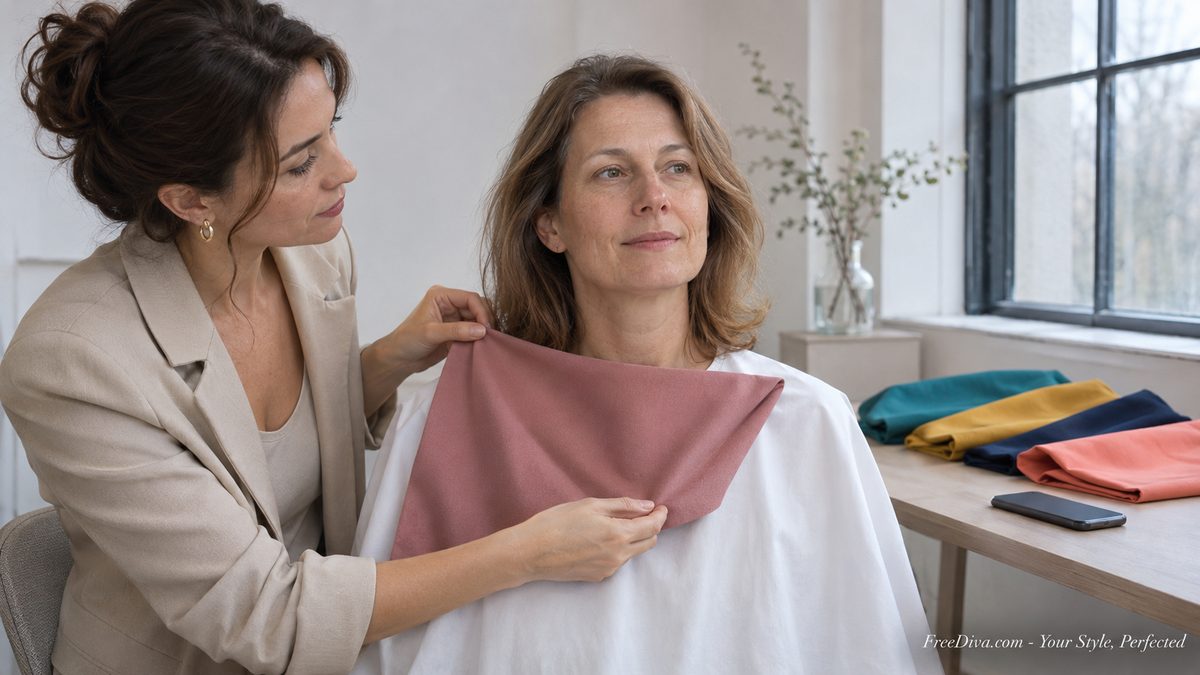
In-person color analysis is a comparison test. You sit in front of a mirror with your hair covered and your clothes hidden under a neutral cape, and the analyst holds one colored fabric drape after another under your chin. Nobody is asking which color you like. The analyst is watching your face: whether shadows under the eyes deepen, whether the skin looks even or blotchy, whether the jaw line sharpens or blurs, whether the color sits in front of you or you sit in front of it.
The method goes back to the four-season system Carole Jackson made famous in her 1980 book Color Me Beautiful, which sorted people into Spring, Summer, Autumn and Winter. Most analysts now work with twelve seasons, which split each of the four by its strongest trait: warm or cool, light or deep, bright or soft. That is the same three-way logic behind every season page on this site, from the Soft Autumn palette to Deep Winter.
A writer for BuzzFeed who booked a professional analysis described the practical side: she was told to wear a white shirt and no makeup "to ensure the most accurate results," the draping itself took about 20 minutes, and the analyst watched "the evenness of my skin" as each fabric went up. The rest of the appointment was makeup, metals and hair color, built on that one reading.
Two things make draping hard to beat. First, the analyst sees you in real light, with real depth, and can move a drape six inches and look again. Second, it is a side-by-side test: warm coral against cool raspberry, ten seconds apart, on the same face. A single photo gives you neither.
Why lighting decides the result
Light has a color, and your skin reflects whatever it is given. Energy Star's guide to bulb color puts most household bulbs at 2200 to 3000 kelvin, the warm yellowish range made to match old incandescent bulbs, while "daylight" bulbs sit far higher on the scale, closer to "blue sky at noon." Take the same face from a lamp-lit living room to a window at noon and its undertone appears to swing from golden to pink.
This is why in-person studios insist on daylight. House of Color, which drapes in person only, says "daylight is more evenly balanced than other lighting" and that "natural daylight is better than artificial light, even on a cloudy day." Good studios use a north-facing window or full-spectrum lamps for the same reason.
Mixed light is worse than either kind alone. A face lit by a window on one side and a warm bulb on the other is two colors at once, and no analyst, human or software, can split the difference reliably.
What your phone camera does to your skin
Your phone does not record color neutrally. It runs automatic white balance, which guesses the color of the light and corrects for it, then automatic exposure, then its own processing to make skin look "good." Every phone maker tunes those steps differently.
Google has been unusually open about how much this matters. Describing its Real Tone work on Pixel cameras, it says camera sensors, processing and editing software "were all trained largely on data sets that had light skin as the baseline," and that it retuned auto white balance and exposure so skin would not come out "unnaturally brighter or darker." If a camera maker has to retune its software to show skin truthfully, any color reading taken from a phone photo starts with the camera's interpretation baked in.
House of Color goes further, saying that because "most cameras will use software and AI color correction algorithms," even the best camera "cannot replicate what is seen in person," and that its own testing during the pandemic found online analysis could not be done "with guaranteed accuracy." That is a business that sells in-person draping, so weigh it accordingly, but the mechanism it describes is real.
Then there is the screen. A reading done by an online analyst passes through your camera, a compression step and the analyst's own monitor. Two of those three you do not control.
What makeup, self-tanner and filters change
Foundation is designed to change the color of your skin, and it does. A warm-toned foundation on a cool complexion can push a reading toward autumn; a pink one can do the reverse. Bronzer, self-tanner and a spray tan add the same kind of overtone, and blush changes the cheeks, which is exactly where most readers, people and software alike, look first.
Hair color matters too. A season is read partly from the contrast between hair and skin, so a recent dye job, especially one far from your natural shade, tells the analyst about your colorist, not your coloring. Analysts cover the hair for that reason. A photo cannot.
Beauty filters are the easiest to forget. Many phone camera apps smooth and warm skin by default, and some do it in the camera itself before you ever see the picture. If your phone has a "natural" or "original" setting, use it.
Online analysis, apps and AI: who sees what
| Method | What it actually reads | Where it goes wrong |
|---|---|---|
| In-person draping | Your face in real light, side by side with drapes | A tired analyst, a poor room, a hard borderline call |
| Online analyst | Your photos, through your camera and their screen | Camera white balance, filters, a monitor they did not calibrate |
| App or AI reading | Pixel colors in your photo, by fixed rules or a model | All of the above, plus a small face or a hat |
| Drape test at home | You, in a mirror, with colored tops or scarves | Your own bias toward colors you already like |
An online human analyst is usually looking for the same things a draper looks for, but in still pictures. Many ask for several photos, sometimes holding colored fabric, so they can make a side-by-side comparison after all. That helps. It still cannot remove what the camera did to every one of those photos in the same way.
Apps and AI tools measure. They find your face, sample skin, hair and eyes, convert those pixels into numbers, and map the numbers onto seasons. They are consistent, quick and free of mood, which is real value. They are also blind to anything the photo got wrong, and most of them do not tell you how sure they are.
How FreeDiva reads your color season, and where it falls short
FreeDiva's color reading runs on the photo you upload to the photo stylist. It uses Google's MediaPipe face and segmentation models, on our own server, to do four things:
- Skin: it finds your face, takes the median color of the cheeks and forehead (not lips, eyes or brows), and reads the undertone as warm, cool or neutral from the hue, and the depth as light, medium or deep.
- Hair: it separates you from the background, takes the area around and above your face down to the nose line, removes the face and anything skin-colored, and names the hair color from what is left.
- Eyes: it samples the ring of the iris, leaving out the pupil, the whites and reflections.
- Season: from those it scores three things, warmth, value (light or deep) and clarity (from hair-to-skin contrast and eye color), and the strongest one names one of the 12 seasons.
On the results page it shows its working: "We read you as" a season, with the undertone, skin depth, hair, eyes and contrast it found, and the swatches, neutrals and metals for that season. If you disagree, you pick another season and the looks use that one from then on. It never pretends a guess is a measurement: with no face to read, it gives no season at all, and with too few hair or eye pixels it skips them rather than guessing.
The limits, plainly:
- It reads one photo, in whatever light you took it in. Every problem in the sections above applies. A photo under warm bulbs will lean warm.
- The face is small. The photo stylist wants you from head to knees, because it also reads your body shape. In a full-length photo the iris is only a few pixels wide, so the eye color is the weakest of the three readings.
- Hats, busy backgrounds and dyed hair can throw off the hair reading. Face paint or a black-and-white photo leaves the undertone neutral.
- The thresholds are a starting point. The cut-offs for warm and cool, light and deep were set on test photos, not calibrated on a large group of real people with known seasons. We are tuning them as real readings come in.
What it does well is give you a quick, free starting point, with the reasoning on the screen so you can see where it might have gone wrong.
How to take a photo that gives any method a fair chance
- Stand facing a window in daylight, late morning or early afternoon, with no lamps on. Overcast is fine, better than direct sun.
- Bare face, or as close as you are comfortable with: no foundation, bronzer or self-tanner.
- A plain white or light gray top, and a plain wall behind you.
- Hair off the face, and no hat or sunglasses.
- Turn off beauty mode and filters, and do not edit the picture.
- Take two or three. If they disagree with each other, your light is the problem.
Can I trust an online color analysis result?
Trust the direction more than the label. If an online analyst or an app says you are a Soft Autumn and you know black has always made you look drained, the warm, muted side of the result is probably right even if the exact season is not. Borderline calls, Soft Autumn against Soft Summer, Deep Winter against Deep Autumn, are where photos fail most often, and they are the calls that need a drape in daylight.
Check any reading with clothes you already own. Take two tops from opposite ends of the result, one from the palette and one it tells you to avoid, and hold them under your chin at a window. The right color makes your skin look even and your eyes clear; the wrong one puts shadows under your eyes and a gray cast on the skin. Our guide to colors that flatter every skin tone and the one on makeup colors for your undertone give you more pairs to test.
Quick answers
Is in-person color analysis worth it?
If you are a borderline case, or you are about to spend real money on a new wardrobe or hair color, yes: a daylight draping with a good analyst sees things no photo shows. If you just want to stop buying colors that make you look tired, a careful photo reading plus a test at the window may be enough.
Why did two apps give me different seasons?
They read different photos, or the same photo with different rules. Small shifts in lighting move a face across the line between neighboring seasons, and each tool draws those lines in its own place.
Can I do color analysis at home?
You can do a fair version: daylight from a window, bare face, hair covered with a white towel, and tops or scarves in pairs of warm and cool, bright and muted. Judge your skin, not the color.
If you want a reading to start from, upload a daylight photo to the FreeDiva stylist, see what it read and why, and change the season if your mirror disagrees. The three looks it builds will follow whichever season you keep, and the cool winter palette and the other season guides are there when you want the full list of colors.
Want Personalized Outfit Recommendations?
Upload a photo and let our AI stylist create complete outfits tailored to your body type, skin tone, and personal style.
Try AI Stylist